
If you sell on BigCommerce, you can already put a video on your product pages without adding anything. There's one catch, and it shapes everything else: the video has to be on YouTube. BigCommerce doesn't take a video file here. You link to a YouTube video, and your page plays it in YouTube's player.
For many stores that's fine. If your product videos are already on YouTube, it takes a couple of minutes. Here's how to add one, where it shows up, and how to tell whether it's all you need.
How to add a video to a product
First, get the video on YouTube.
- Upload the video to your YouTube channel.
- Make sure the video is Public. BigCommerce's help pages say to check that the video and the channel are public if a video won't show.
- Copy its link.
Using a YouTube Short? Change the link first. BigCommerce only accepts the regular form, so youtube.com/shorts/abc123 becomes youtube.com/watch?v=abc123. Keep the same ID; just swap shorts/ for watch?v=. (Paste a Shorts link as it is, and BigCommerce says "The url is neither an image, nor a YouTube video.")
Then add it to the product.
- In your BigCommerce control panel, go to Products › All products and click the product's name.
- Scroll to Images & Videos.
- Click Add from URL (top right of that section) and paste the YouTube link. You'll see the video's thumbnail and YouTube title as a preview. Click Save in that box.
- The video shows up in its own Videos list under your photos, not mixed in with them.
- Click Save at the bottom right of the product page.
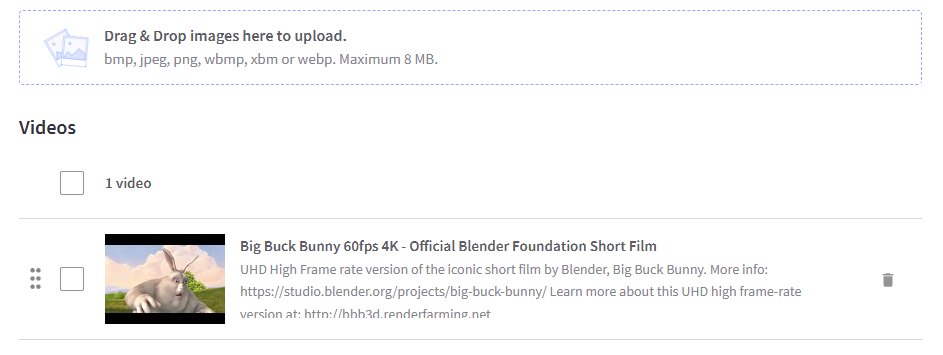
You can add more than one video to a product the same way.
Where it shows on your page
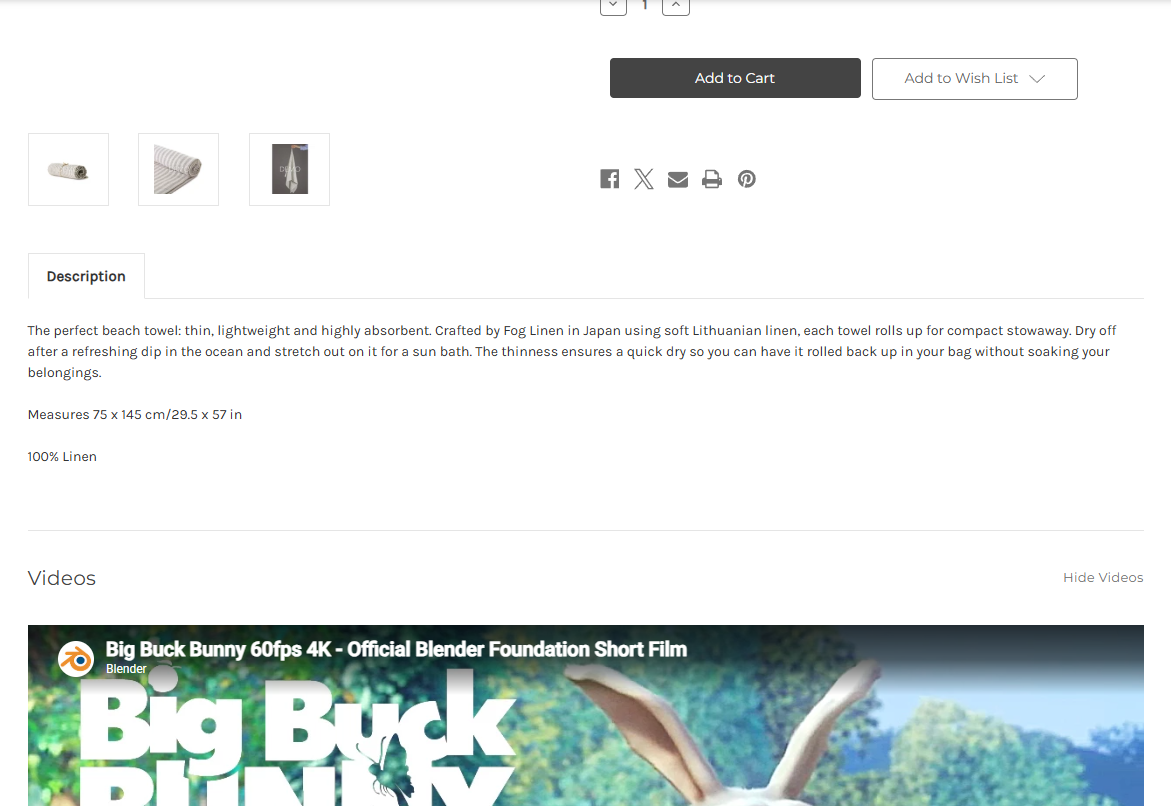
This is the part that surprises people. On BigCommerce's default theme (Cornerstone), the video doesn't go in your photo gallery. It gets its own Videos section further down the page, below the product's photos, price and Add to Cart button. On a phone, that's a long scroll down.
In that section:
- The first video sits in a large YouTube player.
- If you added several, they're listed next to it, and clicking one swaps it into the player. Cornerstone shows up to 8 per product.
- The list shows each video's title and a short description. Both come straight from YouTube, and there's no box to change them in BigCommerce, so the YouTube title is what visitors see. Worth checking your titles on YouTube before you add them.
- Visitors can collapse the section with Hide Videos.
Using a different theme? Themes decide where the video goes, so it may look different. Open a product with a video on your phone and on your computer, and scroll until you find it.
How it plays
- It's YouTube's player, so it looks and behaves like any YouTube video on another site: a click to play, YouTube's controls, and YouTube's name on the player.
- It doesn't play by itself. Visitors have to scroll down to it and click.
- When it ends, YouTube suggests more videos. BigCommerce's theme asks YouTube to keep those to your own channel, which helps, but YouTube doesn't allow turning the suggestions off.
- Vertical videos sit in a wide frame. The player is shaped for regular widescreen video, so a Short or other upright clip shows as a narrow strip in the middle with grey bars filling the sides.
The limits worth knowing
- YouTube only. No uploading a file, no Vimeo. BigCommerce's own developer docs say videos "must be loaded through YouTube at this time."
- Not in the gallery. On the default theme, the video lives in its own section below the product, not next to your photos where people look first.
- BigCommerce checks the video every day. If the video is unavailable on YouTube during a check (say you made it private, or deleted it), BigCommerce stops checking and asks you to add it again. So if you tidy up your YouTube channel, check your product pages after.
- It's for product pages. The Videos section belongs to one product's page. Video on your homepage or a landing page is a separate setup: Page Builder has its own Video widget for that.
- No numbers in BigCommerce. YouTube can tell you how many views a video got overall, but not whether someone who watched it on your product page then added it to their cart.
Is it enough for you?
It probably is if:
- your product videos are already on YouTube, or you're happy to put them there,
- a Videos section lower on the page is fine for how people shop your products, and
- you don't need to know whether the video helped anyone buy.
You might want more if:
- you'd rather not put product clips on YouTube, or you don't want YouTube suggesting other videos on your product page,
- you want the video near the top, where people decide, not a scroll away,
- you want the video to sell, with an Add to Cart button right on it,
- you want numbers: how many watched, how far they got, and whether they clicked or added to cart, or
- you want the same video in more than one place, like a few product pages or a small player in the corner of every page.
Full disclosure: I'm building HoverReel, and it works on BigCommerce. You upload your own video file (it doesn't need to be on YouTube), and you add HoverReel's code once in BigCommerce's Script Manager. It can put an Add to Cart button on the video, and visitors can pick their real size and color right there. It also shows you how many people watched, how far they got, and whether they clicked or added to cart. One thing it can't do: play YouTube links. So if your videos live on YouTube and you're happy with them there, BigCommerce's own Videos section is the way to go. More video on your product pages is a win either way.
Got a question about video on your product pages? Send it to me. I read every one.